
1. The Shift: From Dreaming to Directing
The most critical realization for any creator entering the world of generative video is that an image prompt and a video prompt are fundamentally different tools. While an image prompt describes a frozen moment, a video prompt must describe change over time. In professional cinematography, we use the “Still Half” vs. “Motion Half” sorting logic to prevent technical failure.
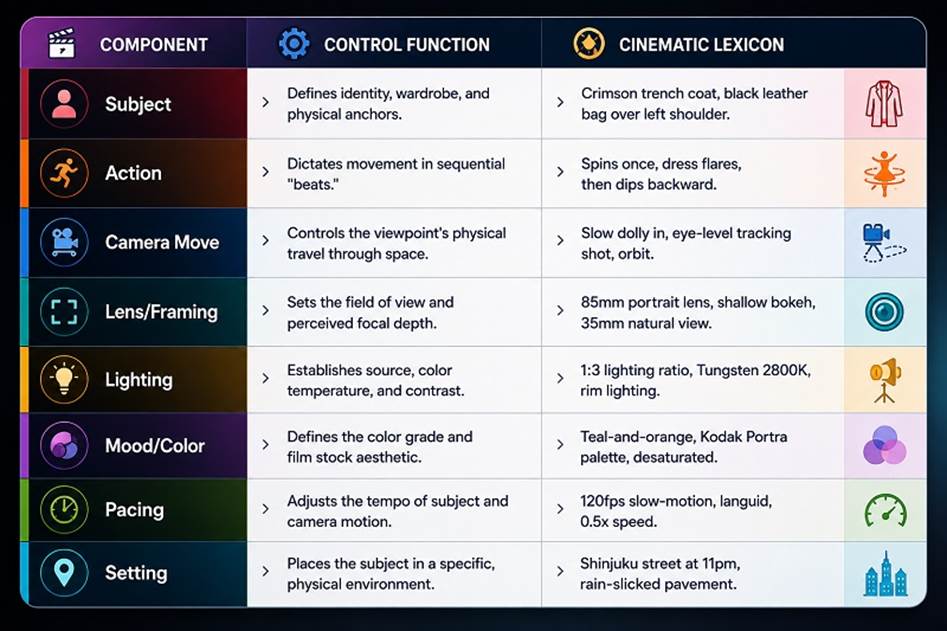
Users typically fail because they saturate the “Still Half” slots—Subject, Lighting, and Setting—but leave the “Motion Half”—Action, Camera Move, and Pacing—entirely empty. When these motion slots are vacant, the model is forced to improvise physics and viewpoint, leading to “soupy” results, “living photo” drift, and the dreaded mid-clip morphing. To direct AI, you must define the diegetic motion of the world and the kinematic motion of the camera with the same rigor you apply to the subject’s appearance.
Key Insight: Structure Over Creativity Professional-grade AI video is not a product of luck or poetic adjectives; it is the result of disciplined structural syntax. Structure, not creativity, is the primary key to cinematic output, as models interpret the world through a literal production lens rather than abstract “vibes.”
Understanding these two halves is the first step toward building the high-fidelity prompt structures required for professional NLE (Non-Linear Editor) workflows.
2. The Anatomy of a High-Fidelity Prompt
To move beyond generic output, a prompt must be distilled into an eight-slot framework. This modular approach allows a director to maintain temporal coherence while swapping specific aesthetic or kinetic parameters.
Understanding these parts is the first step toward the “Tiering System” used by professionals to refine raw concepts into production-ready footage.
3. Comparative Analysis: The Evolutionary Tiers
The distinction between amateur and expert output is most visible through the refinement of “Production Language.” We apply the “Expert” tier to lock identity and physics, preventing the model from hallucinating scene transitions.
Case Study A: The Urban Pedestrian
- Tier 1: Bad (The “Vibe” Prompt)
- Analysis: Lacks camera direction and environmental physics. The model will likely produce a “drifting” character with no consistent identity or weight.
- Tier 2: Good (Adding Structure)
- Analysis: Introduces a tracking move and setting, but the subject may still “morph” due to a lack of identity-locking anchors.
- Tier 3: Expert (Production-Ready)
- Analysis: By specifying the 1.2 meters per second speed and the black leather bag anchor, we force identity locking and physical realism.
Case Study B: The Rocket Launch
- Tier 1: Bad
- Analysis: Results in a static, screen-saver-like animation with flat, weightless smoke.
- Tier 2: Good
- Analysis: Better, but the fire often lacks the violent intensity and atmospheric weight of a real launch.
- Tier 3: Expert
- Analysis: Intensity language (violent explosive force) and atmospheric cues (shockwave ripples) activate the model’s physics engine rather than its generic animation presets.
These expert-level details specifically combat the technical failures of AI models by replacing ambiguity with concrete, observable physical parameters.
4. Controlling the Chaos: Physics and Temporal Consistency
Physics and temporal consistency are the “guardrails” of generative video. Specifying weight, inertia, and environmental forces prevents the “soupy” results caused by the model guessing at how matter behaves in motion.
Consistency Commands To lock the model’s performance and prevent “hallucinated” cuts or lighting shifts, use these five specific commands:
- “Maintain consistent lighting color temperature throughout.”
- “Single continuous shot; no scene cuts, no jump cuts.”
- “Maintain subject identity and wardrobe features across all frames.”
- “No teleporting; motion is continuous and linear.”
- “Locked-off camera; zero drift or unintended rotation.”
Negative Constraints To further harden the render, explicitly forbid common AI artifacts: “No jitter, no hard strobing light, no camera shake, no visual glitches.”
Environmental Physics Mapping | Physical Force | Visual Result / Directorial Instruction | | :— | :— | | Wind (Breeze) | “Light breeze, coat hem lifts at 30 degrees.” | | Inertia | “Subject jogs three steps, then brakes and stops abruptly at the curb.” | | Gravity | “Embers drift upward from the base and fade within 60cm.” | | Atmosphere | “Dust motes dancing in the air, caught in volumetric light beams.” |
Applying this technical rigor ensures that your clips are ready for a repeatable production workflow.
5. The Director’s Toolkit: Advanced Technical Syntax
The following “Quick Reference Guide” summarizes the professional lexicon required to trigger high-fidelity, pre-trained visual patterns within generative models.
Camera Motion (Kinematics)
- Dolly: Whole camera physically moves viewpoint.
- Truck: Sliding sideways alongside the subject.
- Pan/Tilt: Rotating horizontally/vertically on axis.
- Orbit/Arc: Circling subject while staying centered.
- Handheld: Organic, naturalistic human-operator shake.
- Dutch Angle: Tilted horizon to signal unease.
Lens Choice & Depth
- 24mm Lens: Wide view, takes in environment.
- 85mm Lens: Classic portrait, flattens faces beautifully.
- Rack Focus: Focus shifts from foreground/background mid-shot.
- Bokeh: Aesthetic blur of out-of-focus elements.
Lighting & Atmosphere
- Golden Hour: Warm, low-angle light before sunset.
- Chiaroscuro: Extreme contrast, deep blacks, highlights.
- Volumetric “God Rays”: Visible light beams through haze.
- Rim Lighting: Light from behind, outlining silhouette.
This technical vocabulary allows the director to iterate with precision, focusing on model selection and procedural refinement.
6. Implementation and Iteration Strategy
Professional workflows manage compute costs and creative precision through the 5-10-1 Iteration Rule:
- 5 Variations: Run five short clips on a base model to lock the core action and subject.
- 10 Iterations: Refine the best version ten times by adjusting lighting, lens, and pacing.
- 1 Final Render: Submit the perfected prompt to a premium model for high-fidelity output.
The “Front-Loading” Rule Generative models, particularly Veo 3 and Gen-3, weight the first 20–30 words of a prompt most heavily. Always prioritize Subject and Action. Atmosphere and grading belong at the end; if the prompt is over-packed, the model will drop the last instructions first.
Checklist for a Perfect Render
- [ ] No Contradictions: Did I avoid asking for a “static shot” and a “push-in” simultaneously?
- [ ] One Narrative Beat: Does the clip focus on a single, clear choreography (e.g., “opens door and pauses”)?
- [ ] Endpoint Definition: Did I specify where the motion stops? (e.g., “turns and then holds” to prevent warp territory).
- [ ] Physics Activation: Have I described the behavior of wind, weight, or inertia (e.g., “stops abruptly”)?
- [ ] Observable Details: Did I replace “cinematic” with “wet asphalt with Tungsten 2800K reflections”?